
Sending documents for translation shouldn’t feel like a gamble. Yet most delays, quote surprises, and “please resend a clearer scan” emails happen for one reason: the files weren’t translation-ready.
This guide gives you a practical, copy-paste checklist to prepare documents for translation, plus a clear way to estimate costs (including certified translation and document translation certification add-ons) before you upload anything.
If you want a fast, fixed quote, you can upload your file here and tell us the language, deadline, and where you’re submitting it.
The 10-minute “send-it-today” checklist
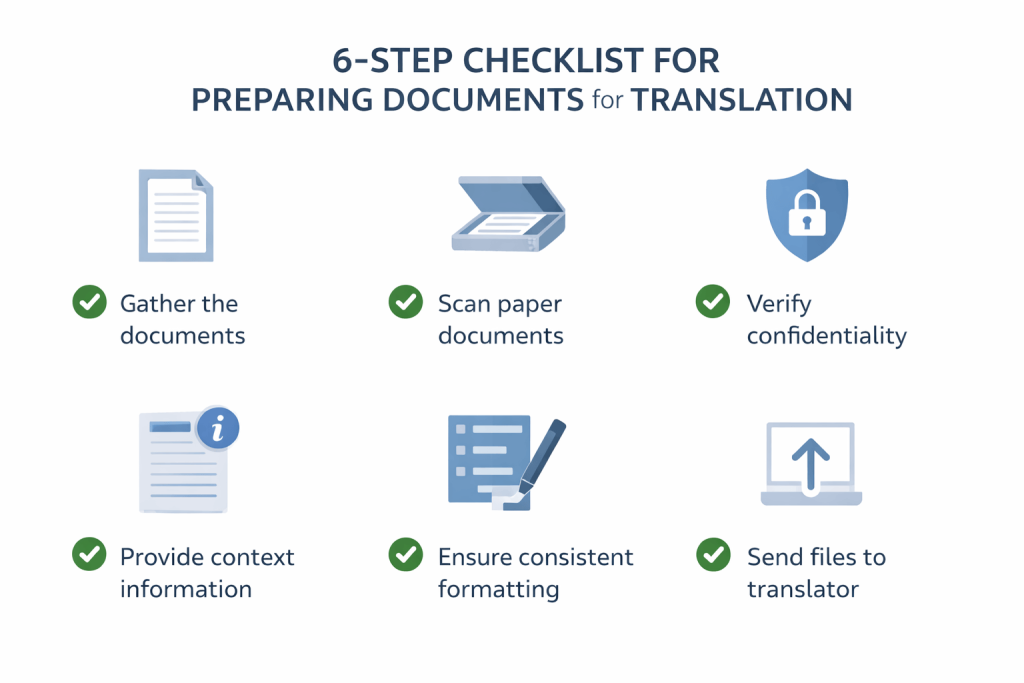
If you only do 10 minutes of prep, do this:
- Confirm the purpose (visa, court, university, business, internal use).
- Decide if you need certification (and whether notarisation/apostille is required).
- Send the best source you have (editable file > exported PDF > clear scan/photo).
- Check legibility (names, numbers, stamps, handwritten notes).
- Add context (country, spelling preference, target audience, any required format).
- Bundle everything into one folder + clear file names.
Ready? Upload your documents for translation for a quote and turnaround time.
What “documents for translation” actually includes
“Documents for translation” can mean anything that contains meaning you need preserved across languages, such as:
- Official documents: birth/marriage certificates, IDs, immigration evidence, police records, academic transcripts, court documents
- Business documents: contracts, policies, HR letters, financial statements, reports
- Medical documents: discharge summaries, lab reports, clinical notes
- Marketing and web content: brochures, landing pages, product descriptions, app strings
- Audio/video that must become text: interviews, meetings, focus groups (often starts with transcription)
If your “document” is a recording, start with transcription services and then translate the transcript (it’s faster, clearer, and usually more cost-effective).
Step 1: Decide what “done” looks like (this controls cost and acceptance)
Before translating documents, answer these three questions:
1) Where will you submit it?
Different organisations care about different details. Some require certification text, signatures, dates, contact details, or specific formatting.
2) Do you need standard translation or certified translation?
- Standard translation: for internal use, general business, information purposes
- Certified translation: for official submission (common for immigration, universities, courts, embassies)If you’re unsure,contact us with the destination country/organisation and we’ll tell you what’s typically required.
3) Do you need notarisation or an apostille?
- Notarisation: a notary public verifies the identity/signature on certain documents (sometimes required by courts/embassies)
- Apostille: legalisation for use overseas, often requested for official cross-border use
Only do these if the receiving body asks for them. They add time and cost.
Step 2: Use the “Translation Readiness Score” (quick self-audit)
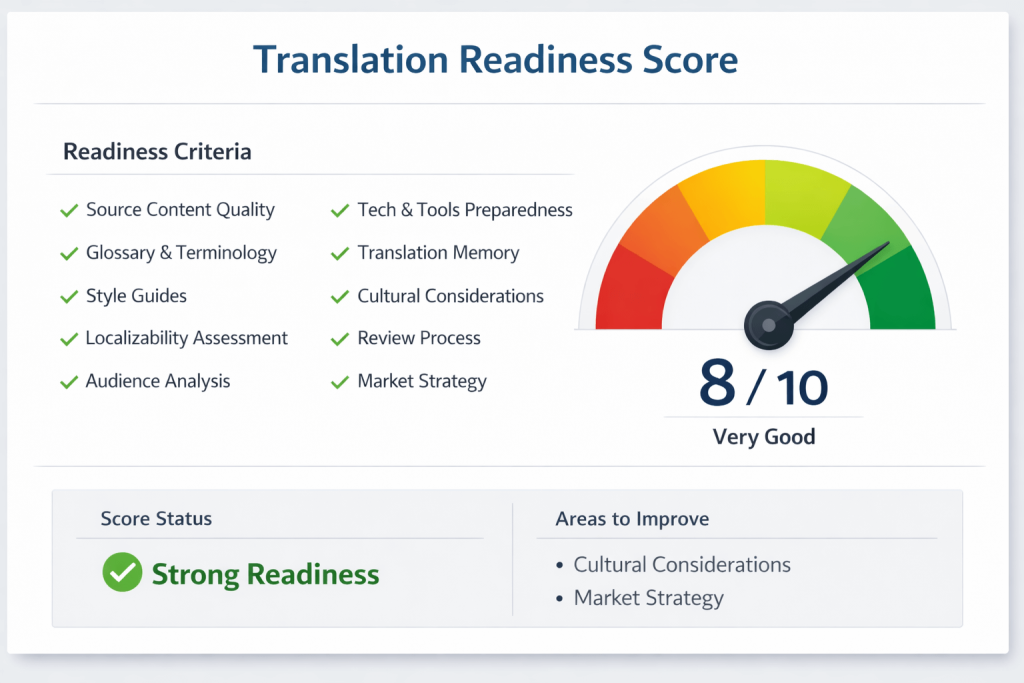
Give your file 1 point for each “yes”:
- I’m sending an editable original (Word, Excel, PowerPoint, InDesign)
- If it’s a PDF, it’s text-based (not a photo of text)
- If it’s a scan/photo, it’s sharp (no blur/shadows)
- All names, dates, numbers are readable
- Stamps/signatures/handwritten notes are visible
- I included all pages (front/back where relevant)
- I confirmed target language + locale (e.g., US English vs UK English)
- I explained the purpose and destination (visa/court/university)
- I listed terms to keep consistent (names, brands, technical terms)
- I specified the delivery format I need (PDF, Word, certified cover sheet)
Score guide
- 8–10: Translation-ready (fastest turnaround, cleanest quote)
- 5–7: Expect questions (minor delays, possible formatting/clarification fees)
- 0–4: Likely rework (rescans, OCR, layout rebuild, higher risk of errors)
Step 3: Prepare documents for translation (complete checklist)
A) Finalise the source (avoid “moving target” costs)
- Freeze the version you want translated
- Resolve tracked changes/comments
- Fix obvious typos (especially names and numbers)
- Confirm the final page order
Why it matters: changes after translation starts can trigger re-translation, reformatting, and extra QA.
B) Send the best file type you have (this is the #1 cost lever)
Best → worst
- Original editable files: .docx, .xlsx, .pptx, .indd, .ai
- Exported PDFs from originals (selectable text)
- Scans/photos (only if originals aren’t available)
- Screenshot fragments (avoid unless unavoidable)
If you only have a scan, don’t worry—we can still translate it. Just expect that layout recreation and quality checks may add time.
C) Scan/photo quality rules (especially for certified translation)
For official documents, quality is everything. Use these rules:
- Use bright, even lighting (avoid shadows across text)
- Capture the whole page, square-on (no angles)
- Ensure stamps, seals, and signatures are fully visible
- Don’t crop off page numbers or margins
- Include front and back if there are notes/stamps on both sides
Quick test: zoom in to 200% on your phone/computer. If any character becomes unclear, retake.
D) Protect sensitive data (without breaking the document)
If your documents for translation include personal data, you have options:
- Redact only what’s not required (never remove key identifiers if the document is for official use)
- Share through secure upload channels where possible
- If your organisation requires it, request an NDA or secure workflow
If you’re handling legal/medical content and need extra safeguards, tell us at upload time.
E) Add context (this prevents mistranslations)
Attach a short note (even 4–6 lines helps):
- Who is the audience?
- What country/authority is this for?
- Any required terminology (names, product terms, legal phrases)
- Any words that must stay unchanged (e.g., proper nouns, codes, serial numbers)
Example message you can copy
Target language: English (UK). Purpose: Home Office application. Keep names exactly as in passport. Preserve all stamps and handwritten notes. Deliver as certified PDF + one hard copy.
F) Lock in consistency (names, dates, numbers)
This is where most rejections happen for official submissions.
- Confirm spelling of names exactly as in IDs/passports
- Decide date format (DD/MM/YYYY vs MM/DD/YYYY)
- Keep addresses and reference numbers identical
- Note any transliteration preference (e.g., Arabic names into Latin alphabet)
G) Formatting and layout requirements (choose one)
Pick what you want the translated document to look like:
- Clean text translation (fastest, lowest cost)
- Like-for-like layout (mirrors tables/stamps/line breaks where practical)
- Print-ready / DTP (InDesign, brochures, complex formatting)
If layout matters (tables, forms, stamps), say so clearly at the start.
Document translation certification: what it is (and what it isn’t)
“Document translation certification” usually means the translation includes a signed statement (often called a certificate of accuracy) confirming:
- the translation is complete and accurate
- the date of translation
- the translator/agency’s name and signature
- contact details (and sometimes credentials)
Important: Certification is about the translation’s attestation. Notarisation and apostille are separate processes and are only needed when specifically requested.
If you need certified output, start here: certified translation services.
Costs: What translating documents typically costs (and why)
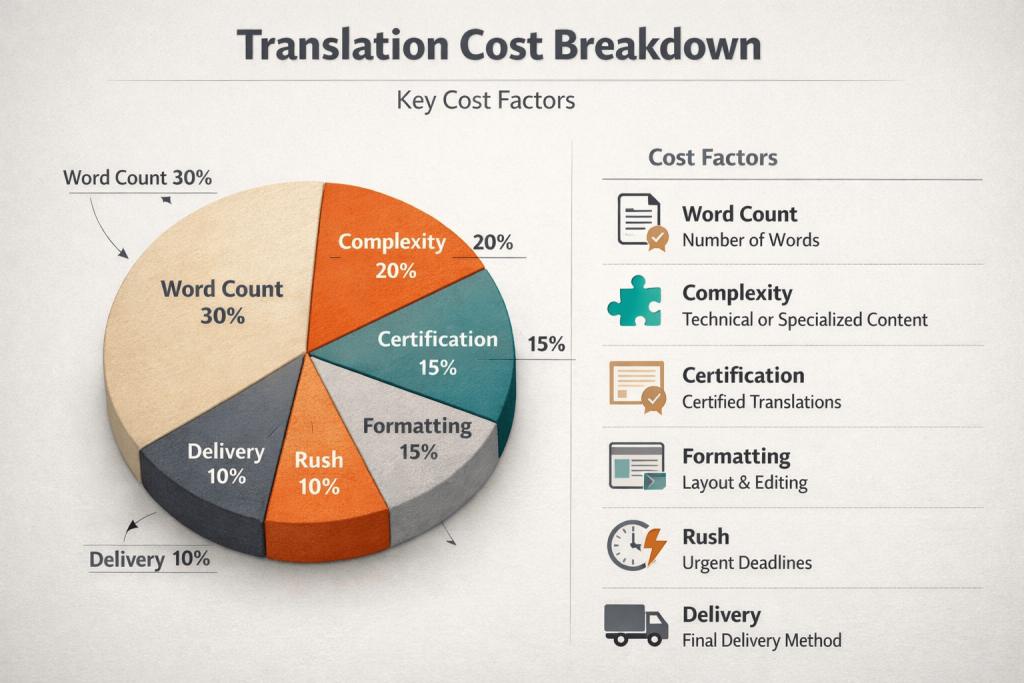
Translation pricing is driven by four things:
- Volume (word count/pages/minutes of audio)
- Complexity (legal, medical, technical vs general)
- Language pair (common vs rare)
- Deliverables (certification, layout, notarisation, apostille, hard copy)
Common pricing models
- Per word: best for long documents (contracts, reports)
- Per page/document: common for certificates and official documents
- Per hour: layout/DTP, complex formatting, handwritten material
- Minimum fee: many projects have a base charge even for short texts
Typical add-ons that affect cost
- Certified translation / certificate of accuracy
- Notarisation
- Apostille/legalisation handling
- Hard copy postage
- Layout recreation (tables/forms)
- Rush turnaround (same day / 24–48 hours)
A simple cost estimator you can use
Estimated total = (word rate × word count) + certification + formatting + rush + delivery
If you don’t know the word count, send the file and we’ll confirm volume and pricing quickly.
For UK certified documents, simple one-page items often start from around £30 + VAT per page depending on language and format. For a precise figure, upload your file—we’ll quote based on your exact document.
Real-world examples (to help you budget)
These are illustrative examples to show how quotes are built.
Example 1: One-page certificate for official submission
- Source: clear scan, 1 page
- Deliverable: certified translation PDF
- Cost drivers: certification + page-based pricing
- How to lower cost: send the clearest scan; include front/back only if needed
Example 2: 12-page contract for business use
- Source: editable Word file
- Deliverable: translated Word with tracked consistency
- Cost drivers: word count + legal complexity + QA
- How to lower cost: provide a glossary of defined terms; freeze the final version
Example 3: 6-page scanned report with tables + handwriting
- Source: photo-scanned PDF
- Deliverable: like-for-like layout
- Cost drivers: readability checks + layout recreation + ambiguity resolution
- How to lower cost: rescan at higher quality; provide any missing typed text separately
Want an exact quote (not an estimate)? Start your project here.
What slows translations down (and how to avoid it)
Delay triggers
- Blurry scans, shadows, angled photos
- Missing pages or cropped stamps
- Unclear handwriting without context
- Mixed versions (“final_v3_FINAL2”)
- Late changes after translation begins
- No destination/purpose provided (can change certification requirements)
Fix in 60 seconds
- Rename files clearly: Surname_Name_DocumentType_Date.pdf
- Add a one-paragraph brief with purpose + destination
- Include a reference (previous accepted translation, glossary, style preference)
After delivery: a fast acceptance check (especially for certified work)
Before you submit:
- Check names match IDs exactly
- Check dates and numbers carefully
- Confirm all stamps/seals/notes are represented
- Ensure the certification page includes required details (signature/date/contact)
- Verify the output format matches what the authority expects (PDF/hard copy)
If anything looks off, request corrections immediately while the project context is fresh.
Copy/paste: Complete checklist to prepare documents for translation
Use this as your internal process:
- I confirmed destination/purpose (visa/court/university/business)
- I confirmed target language + locale (US/UK, regional variants)
- I chose the right deliverable (standard vs certified vs notarised/apostilled)
- I’m sending the best file type available (editable preferred)
- All pages are included (front/back where needed)
- Scans/photos are sharp at 200% zoom
- Names/dates/numbers are verified against IDs/source records
- Stamps/seals/signatures/handwritten notes are visible
- I included terminology notes/glossary if relevant
- I specified formatting needs (clean text vs like-for-like vs print-ready)
- I set a deadline and noted any hard-copy delivery needs
- I included a single folder or zip with clear file names
When you’re done, upload your documents for translation and we’ll confirm cost, timeline, and the right certification format.
FAQs
What are “documents for translation”?
Documents for translation are any files that must be converted into another language while preserving meaning, formatting requirements, and (when needed) official certification—such as certificates, contracts, transcripts, medical reports, or business documents.
How do I prepare documents for translation to avoid delays?
Finalise the source, send editable files when possible, ensure scans are clear, include all pages, and add a short brief explaining purpose, destination, and formatting needs. This reduces back-and-forth and prevents rework.
What is document translation certification?
Document translation certification is a signed statement (often a certificate of accuracy) attached to the translation confirming it is complete and accurate, dated, and verifiable with the translator/agency’s details. It’s commonly required for official submissions.
How much does translating documents cost?
Costs depend on word count/pages, complexity, language pair, turnaround time, and whether you need certification, layout recreation, notarisation, apostille, or hard-copy delivery. The fastest way to get an accurate price is to share the file and requirements.
Can I translate a scanned PDF or a phone photo?
Yes. Clear scans/photos are commonly used for official documents. However, poor image quality can slow the process and may increase cost if layout recreation or clarification is required.
Do I need notarisation or an apostille for my translation?
Only if the receiving authority requests it. Many submissions require certified translation only, while notarisation/apostille are separate steps used for specific legal or cross-border requirements.
